Buying advice
Inflatable gazebo walls: full, window or zip entrance?
Choose inflatable gazebo walls around customer access, visibility and your artwork. Compare full, window and centre-zip panels before designing your setup.
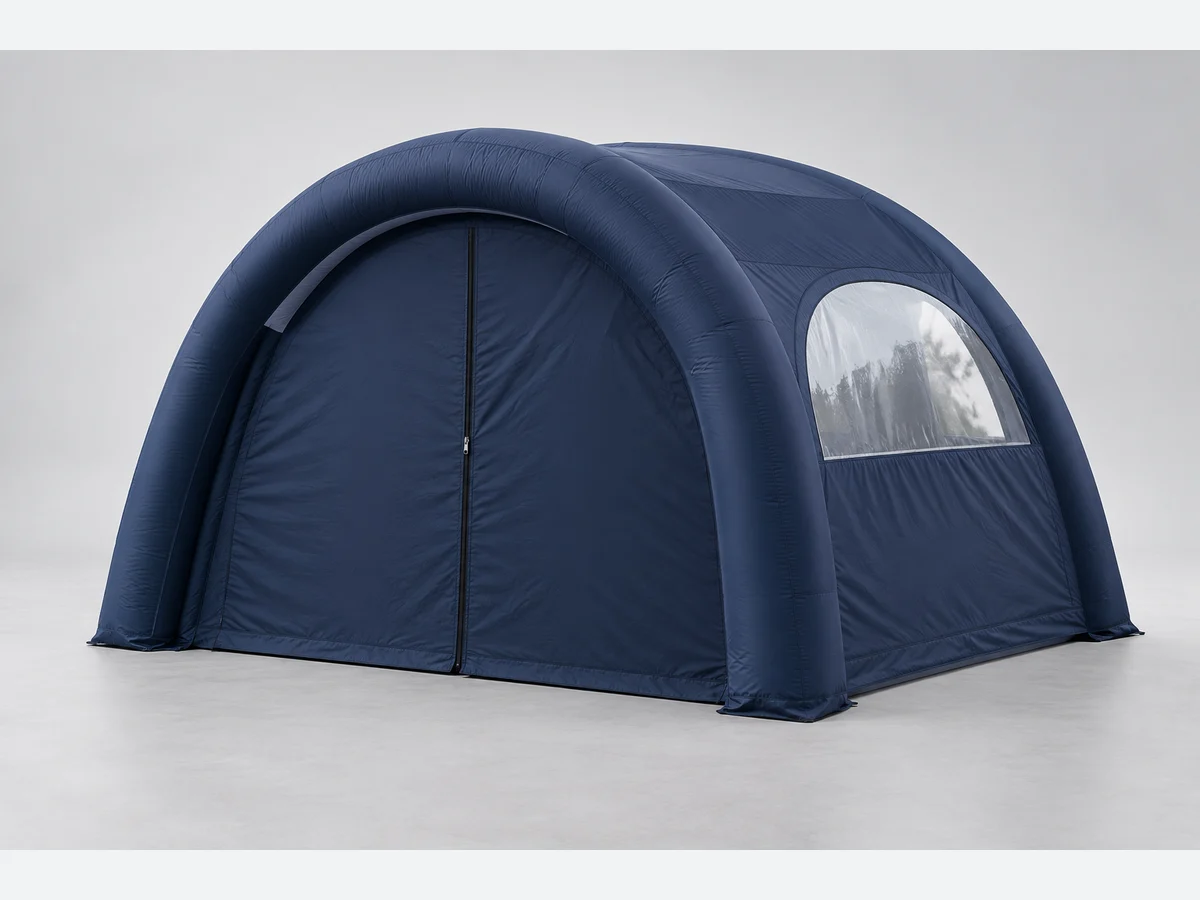
AI-generated editorial illustration, not a customer installation or an exact product specification. Check the selected configuration in Studio.
Start with where customers will approach
Choose your inflatable gazebo walls around the way people will use your pitch. A back panel, a side facing the neighbouring stand and the customer entrance have different jobs. Sketch the booked space and mark the direction people are likely to approach, where your team will stand and where you will put a table or display. Then decide which sides need fabric and which should remain open. Whizprint Studio lets you choose each side separately: no wall, a full wall, a zip entrance wall or a window wall. You do not need the same panel on all four sides.
Use a full wall for a clear printed backdrop
A full wall gives you an uninterrupted fabric area for a main message or photograph. It can work behind a demonstration table or on a side where you want the branding to be visible from outside. Plan the design with the furniture in place: a headline near the bottom may disappear behind stock or a counter. Give the wall one main purpose, such as identifying your business or explaining your offer, rather than treating every available centimetre as space for more wording. Check the inside and outside views, since Whizprint’s inflatable wall options include the same artwork printed on both faces.
Choose a window wall when the upper view matters
A window wall gives a view through its upper opening while retaining a printed fabric panel below. This can suit a side where you want visitors to see activity inside, but still need a lower branding area. The window is not a printable background. Place your logo, headline and contact details on the fabric shown in the selected template. A design prepared for a full wall may need more than a small adjustment: moving the headline down, simplifying the message or changing the image crop can help it fit the remaining area. Check that nearby furniture will not hide the relocated wording.
Plan a zip entrance as two meeting halves
The zip entrance wall has a centre zip running from the top of the wall to the bottom edge. Treat that line as part of your composition from the start. A word or small logo placed directly across it may be interrupted when the entrance is opened. You could put a logo on one half and a short message on the other, or keep the most important information on another fitted wall. Judge the design both as a closed panel and as an entrance people will use; a complete image on a closed wall does not remain complete when its halves are moved aside.
Decide whether the wall and canopy share one design
A continuous design can carry a photograph or a large graphic across a canopy side and its fitted wall. A separate design lets each piece have its own message. Think about how often you expect to display the gazebo without that wall. If the wall is removed, the part of the image printed on it is absent too. Keep essential branding on the canopy if it needs to remain visible in both arrangements. In Studio, compare the combined design with the individual piece view. The combined view helps you judge the overall composition; the individual templates show the separate printed pieces.
Check the selected wall before ordering
Before you finish, review every side and its wall type, then look at the artwork in the corresponding template. Confirm that a window does not remove important content and that the entrance zip does not split small text you need people to read. Rotate the 3D preview to check the sides visitors will see. The preview helps with design choices, but does not establish site suitability or replace the organiser’s requirements for your pitch. If you are unsure which arrangement suits your event, use the setup enquiry or WhatsApp option in Studio and include your pitch layout, intended use and event date. Explore the inflatable gazebo options below to build that starting point.