Product guide
Lightbox extras: TV holders, shelving and counters explained
Choose lightbox extras around your demonstration, samples and storage needs, including TV holders and shelving.
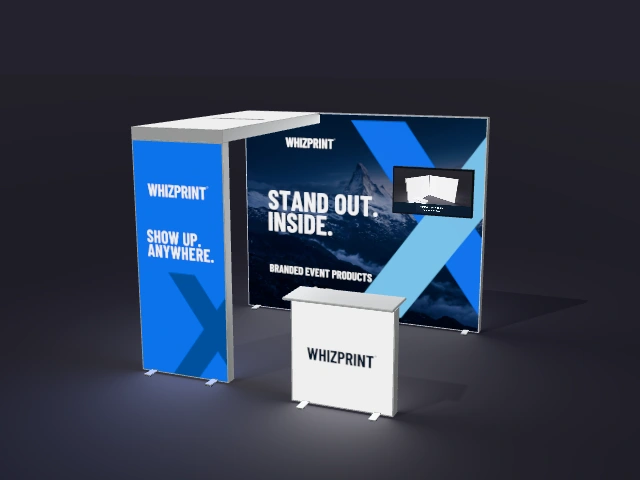
Illustrative preview; check the selected product configuration for included items.
Start with what visitors will do
List the activities your stand needs to support before selecting extras. A screen presentation, handling product samples and completing a form each need a different arrangement. Sketch where visitors and team members will stand, then choose the components that support those activities. Filling every available wall with hardware can leave too little room for a conversation.
A TV holder does not require shelving
In the Whizprint lightbox configurations, the TV holder fits independently of the shelving module. You can choose a holder, shelving or both. The screen in the preview is illustrative and is not supplied. Check the holder’s suitability for your intended screen before ordering; do not infer a load limit, screen size or mounting standard from the render.
Choose shelving for the samples you display
Think about the number, dimensions and weight of the items you want visitors to see. A shelf is useful only if the samples fit and remain easy to view or handle. Confirm the relevant specifications for the selected component rather than estimating from the image. Check that samples will not hide the headline or the main artwork on the wall behind them.
Give the counter a clear role
A counter might be a welcome point, a place for a demonstration or a surface for completing enquiries. The lightbox options include different counter arrangements, so inspect the front and reverse of the selected version. Plan access for the team and decide where bags, leaflets or other supplies will go. Do not assume that every counter has enclosed storage.
Review hardware and artwork together
Add the available extras to the chosen layout in Studio and rotate the setup. Check how the screen, shelves and counter affect the printed surfaces. Keep essential wording clear of the hardware and confirm exactly which components are selected. If technical compatibility is not stated, ask us before committing to the equipment you intend to use.